

There are many ways to determine if a website is fake—here’s what we recommend.
The internet is full of websites that are either fake, fraudulent or a scam. It’s a sad fact of life. You see, the evolution of the internet has brought with it a number of extremely convenient advances in the way we shop, bank, and interact with the world around us. At the same time, that evolution has also given way to new risks—new avenues for criminals to rip off the unsuspecting. In 2018 Cybercrime will be a $1.5 trillion industry.
Really, what it all boils down to is fraud. These hackers and cyber criminals are little more than new age con men. And the con game is as old as time itself—people have literally been tricking one another since the beginning of time. And in the same vein as ancient mystics and old-fashioned snake oil salesmen, these con-men are after one thing: your money.
Nowadays their tactics tend to involve phishing. Lots and lots of phishing.
What is Phishing?
Phishing is a type of online fraud that involves getting an individual or organization to disclose sensitive, sometimes compromising information, under false pretenses that have been expertly manufactured by the attackers. Tailoring your phishing attack to your target is sometimes called spearphishing, it’s a form of social engineering. These attacks take several forms, often elaborately combining multiple mediums to create the impression of legitimacy.
What does that mean?
Well, let’s look at an example. An attacker may start by sending you a formal looking email from an address that resembles an official account. It may say something like, “an attempt to login to your account has been made from another country, please update your password.”
In fact, that’s exactly how John Podesta, the chairman of Hillary’s Clinton’s presidential campaign, had his email account compromised.
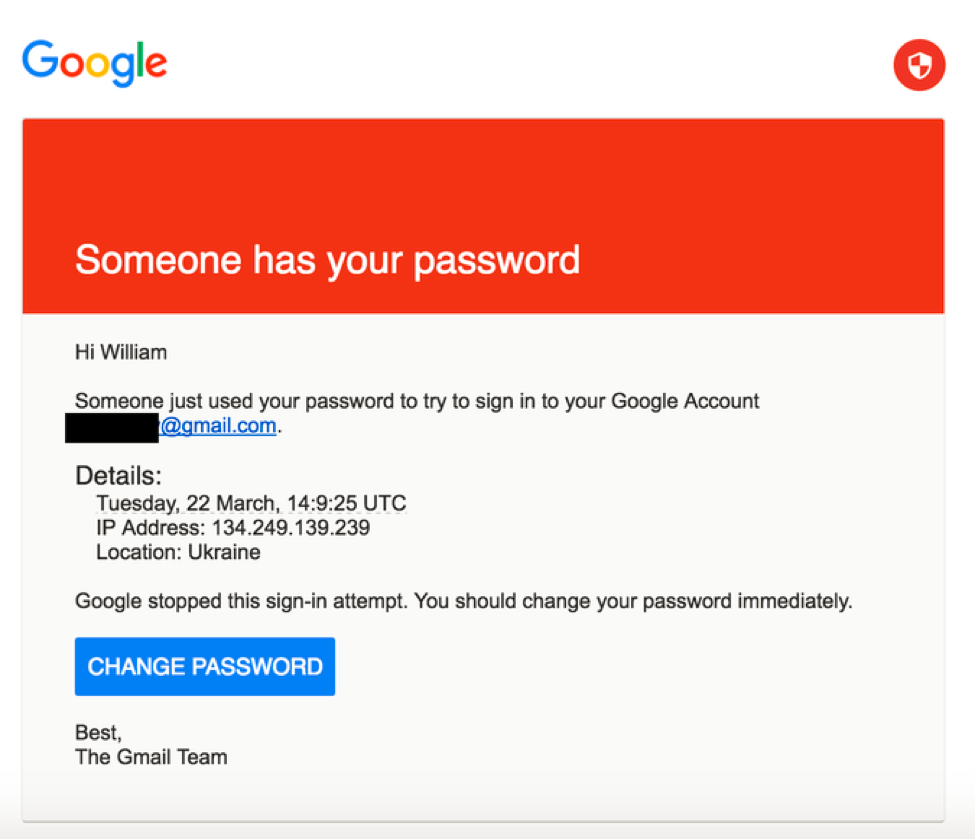
That email included a link to a specially designed page that is a perfect replication of the Google login page. To the untrained eye, it’s almost impossible to tell the fake site from the real one. You can see how similar tactics could be used to steal financial information or medical data. Here’s an example of a fake PayPal login screen:
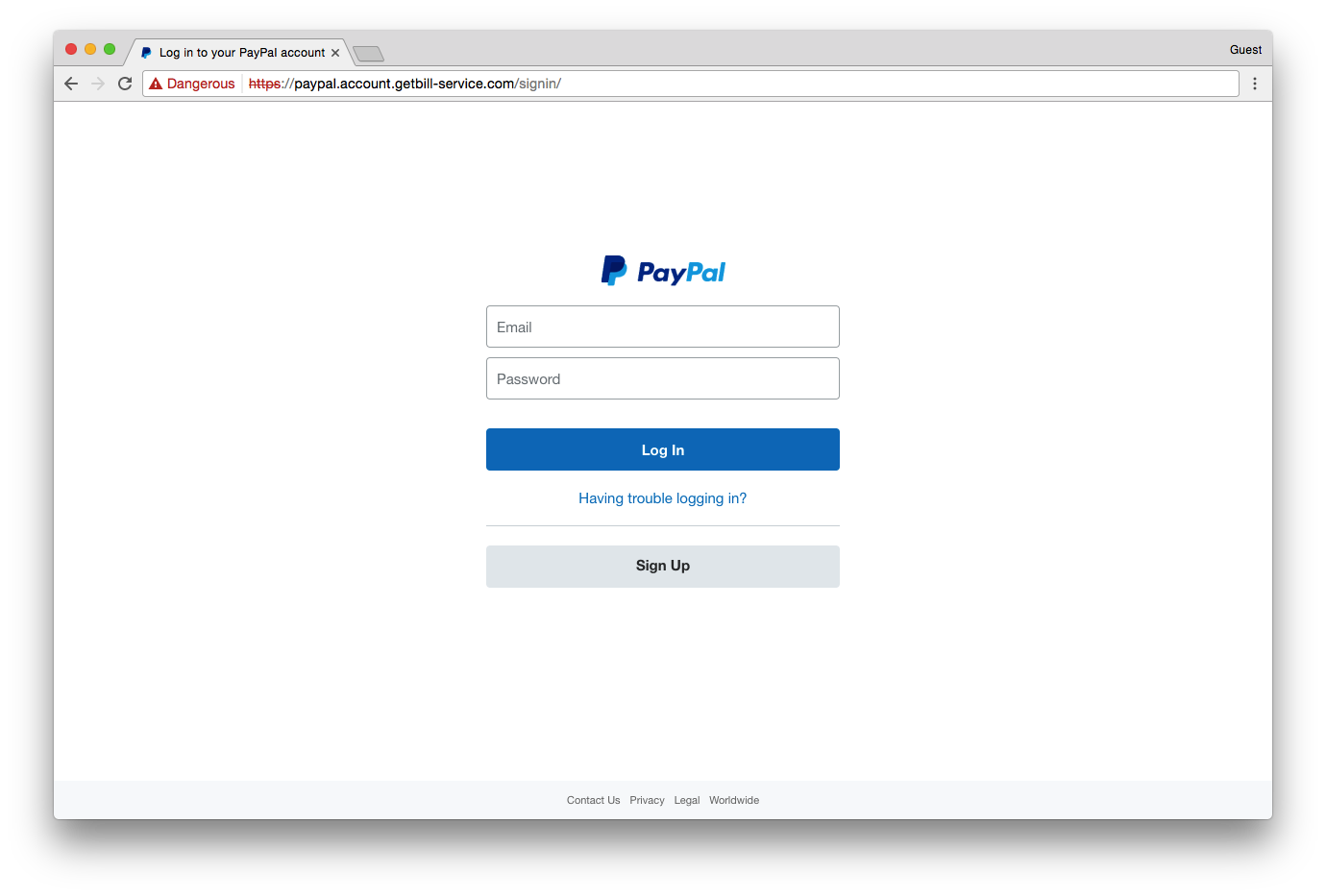 And with the advent of free SSL services and recent changes to browser indicators, it’s becoming easier than ever to disguise phishing sites as legitimate.
UPDATE: Google has now changed its browser UI to be less misleading.
Other Types of Cyber Attacks to Be Aware Of
Phishing is amongst the most prevalent, but not the only type of attack that you need to be wary of on the internet. Here are some examples of other types of internet malfeasance:
- Third-Party Content Injection – The most common example of this is over public WiFi hotspots. Have you ever noticed an abundance of extra ads or pop-ups (on websites that don’t normally contain them) when you’re at the mall or the airport? This is an example of third-party content injection. Because the website lacks SSL, the ISP can inject its own content onto the site. This means you’re not seeing the site as it’s intended. And if the third-party has negative intentions, it can inject harmful content.
- Eavesdropping – Similar to phishing, if an attacker knows how, they can eavesdrop on a connection and steal any information being transmitted. This underscores the need for connection security—without it, everything you send online can be intercepted and stolen by anyone who wants it.
- Good Old-Fashioned Fraud – Ever seen a 20-dollar iPad? Neither have we. Now, that doesn’t mean you won’t see websites advertise them—they just almost never exist. In all likelihood you’re about to wire money to an account in the Philippines. Staring longingly at that low-res image on the pop-up ad is the closest you’ll ever get to actually owning the tablet.
5 Ways to Determine if a Website is Fake, Fraudulent, or a Scam
Here are 5 ways to determine if a website is fake – plus some additional tips to stay safe online.
1. Pay Close Attention to the URL
You would be absolutely shocked how many people pay little to no attention to the address bar of their browser. This is a huge mistake. The address bar contains a ton of vital information about where you are and how secure you are there. So get into the habit of occasionally glancing up there whenever you visit a new page.
In fact, most of the browsers abide a concept called the Line of Death. The idea is that a user should never trust anything below a certain point on the browser, the so-called line of death. An attacker can control everything below the line (and even some things above it) so you have to know where to look for reliable information.
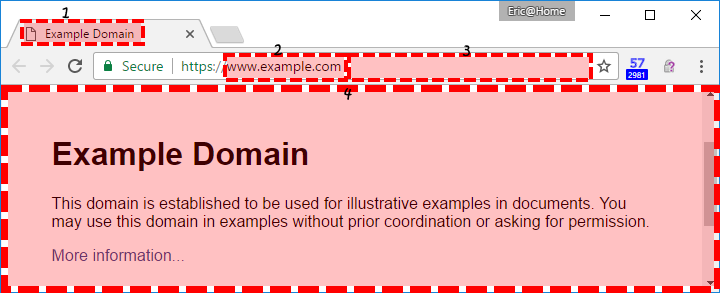
The areas that an attacker can control are highlighted in red and numbered. Let’s go over them really quickly:
- The Favicon – Websites can put whatever icon they want in the tab.
- Domain Name – This is part of the URL and it’s trustworthy, as long as you know what you’re looking for (more on that in a second).
- File path/Director – Ditto.
- Web content area – This can be whatever the attacker wants it to be, including a very convincing spoof of a legitimate website.
One of the chief tactics in phishing is to create a website that is almost indistinguishable from the real thing. In order to do this, hackers and cybercriminals have gotten very ingenious in the ways they copy URLs. Between the ability to create sub-domains that mimic real domains and how browsers can confusingly shorten URLs, it’s easy to get duped.
Related: What is Unicode Phishing?
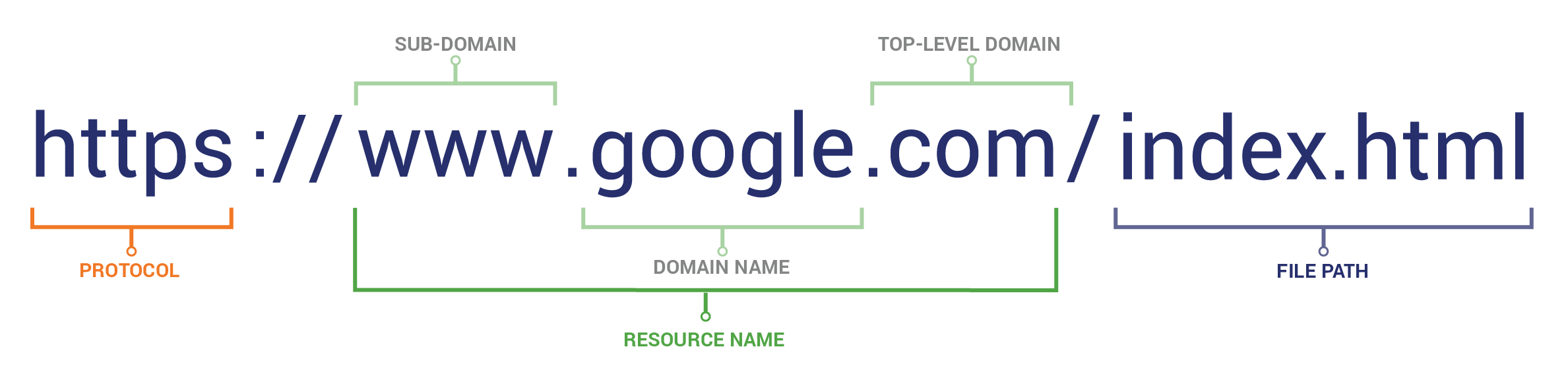
In order to know what to look for when examining the URL, you need to know how a URL is constructed.
Related: Secure Your Domain & Sub-Domains with a RapidSSL Wildcard Certificate.
Now, armed with that knowledge, always make sure that you know what the actual domain you’re on is. Sub-domains can be misleading. Here’s an example of a first- and second-level sub-domain that intentionally mimic a domain and TLD:
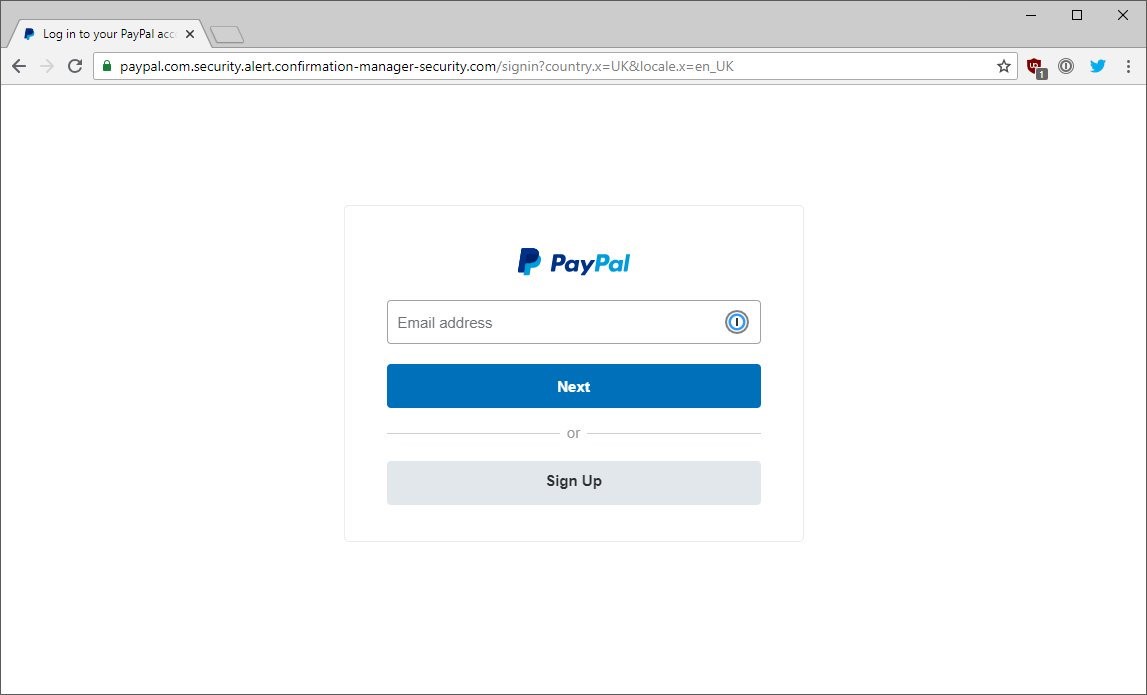
This URL is designed to look like it’s PayPal.com, but if you look closer you’ll notice that those are sub-domains, the name of the actual domain is “confirmation-manager-security.” Remember, the real domain name appears right before the TLD (e.g. .com/). This is not really PayPal. This is a phishing site. Notice how it still displays the little green padlock thanks to the use of an SSL certificate?
That’s why you always have to check the URL.
2. Check Connection Security Indicators
Back to the address bar. If the last point didn’t underscore the importance of this browser feature—this one should drive the point home. Within the address bar are several connection indicators that let you know whether your connection with this website is private. As we mentioned earlier, it’s possible to eavesdrop on connections on the internet.
 The internet was built on HTTP, or the hypertext transfer protocol. When HTTP was first defined the internet was not used for commercial activity. In fact, commercial activity on the internet was actually illegal at the time. The internet was primarily supposed to be a platform for the free exchange of information between academia and the government. Any communication done via HTTP is sent in plaintext and can be intercepted, manipulated, stolen—you name it.
In order to remedy this, SSL or Secure Sockets Layer was developed. SSL was later succeeded by TLS or Transport Layer Security. Today, we colloquially refer to both as SSL.
At any rate, HTTP + TLS = HTTPS, which is a secure version of HTTP that prevents communication from being intercepted and read by anyone but you and the website you are connected to. That’s a lot of information, but what you really need to know is this:
HTTP = Bad
HTTPS = Good
Never trust an HTTP website with your personal information.
Now, let’s get to connection security indicators. You want to look for one of the two following indicators:
The Padlock Icon
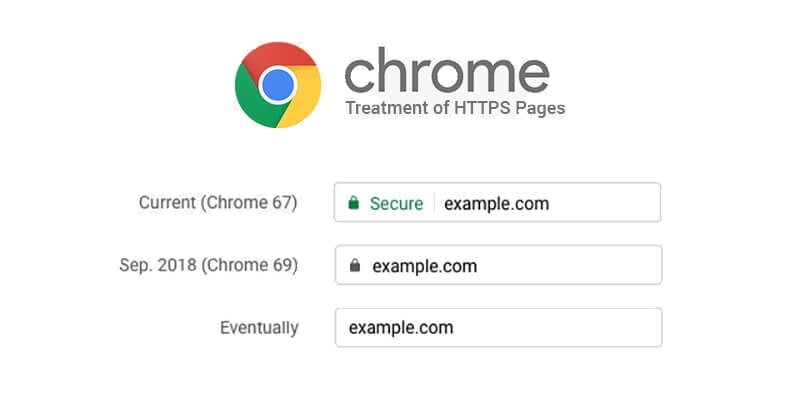
Or, the EV Name Badge/Green Address Bar

Both of these icons indicate that the website is using HTTPS and that you have a secure connection. If you see either of these, your connection is secure and you are communicating privately with the website listed in the URL.
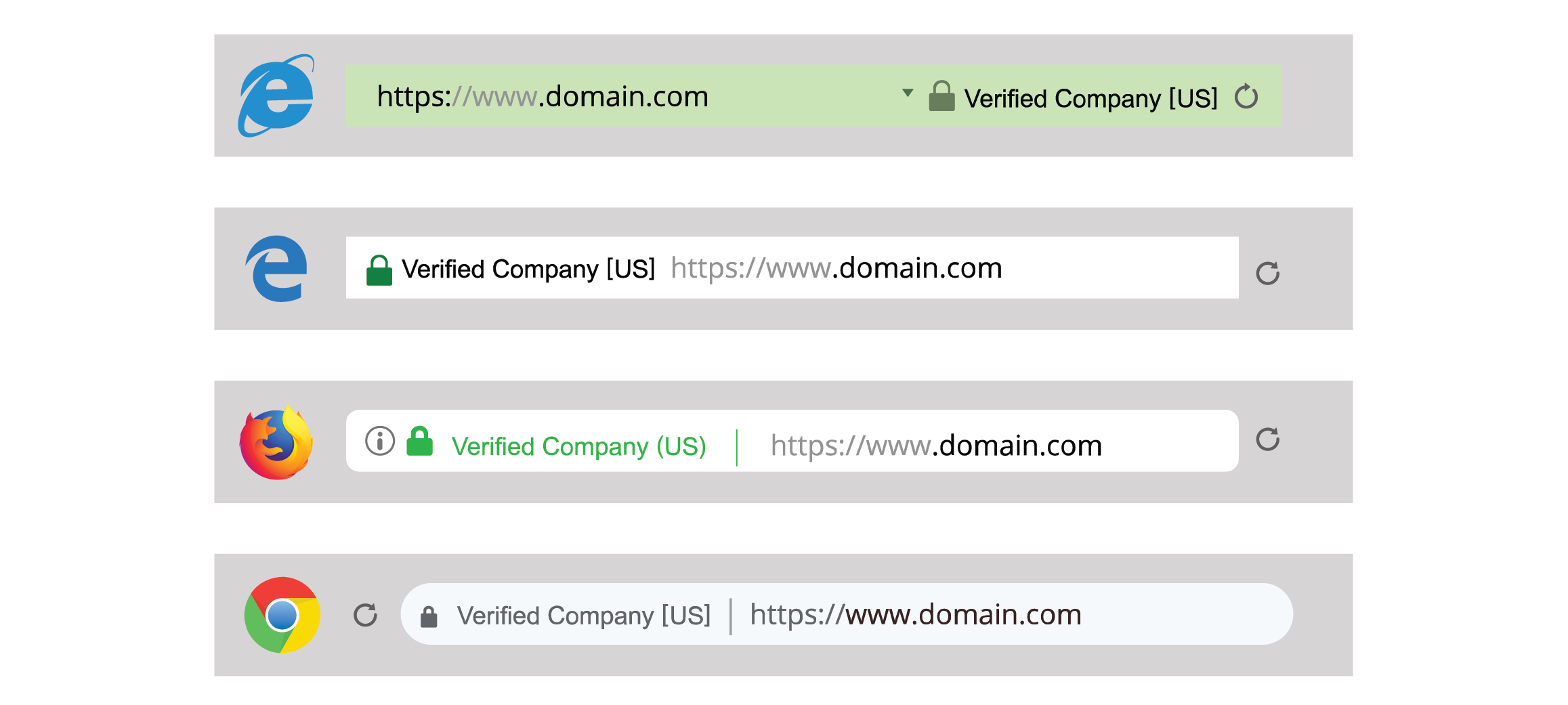
Remember, most secure connections will have the padlock icon, but some may also have the Green Address Bar. Or rather, it used to be uniformly green. Nowadays, different browsers display the EV Name Badge in different ways.
The Green Address Bar/EV Name Badge is only shown when a website is using a specific type of SSL certificate known as an Extended Validation (EV) SSL Certificate. This certificate allows a website to assert its identity and prove it is operated by a real-world, legally incorporated company. Browsers give websites with EV SSL certificates preferential treatment by displaying the company name to the left of the URL. When you see an EV Name Badge, you can relax—you’re secure. The green address bar cannot be faked, it is un-impugnable proof of identity—and by extension trustworthiness.
The exact appearance of EV name badge varies by browser. Sometimes the name is written in green, sometimes it is inside a green rectangle and sometimes it’s not green at all. Here are a few examples of how EV certificates look in popular browsers:
It’s possible for a URL to have HTTPS in it but for the padlock icon not to appear correctly, too. This indicates that there is some security issue with the connection – usually mixed content, when a site is still loading some assets that are HTTP – and represents a cause for concern. If this is the case, it’s best to assume you do not have a secure connection.

You will now see the “Not Secure” warning on all websites that are being served via HTTP as of July of 2018, too. This will give you an immediate visual indication that your connection is not secure.

Now, one more thing: A secure connection doesn’t necessarily equate to a safe website. Lots of fake websites use free SSL certificates. Think of it like this:
- You should only visit sites that use HTTPS
- Just because a site has HTTPS, doesn’t mean you can automatically trust it.
Just because the connection is secure (which should be mandatory), you don’t necessarily know who is on the other end of that connection. Outside of Extended Validation SSL and the EV Name Badge, which can be trusted on site, you’ll need to do a little more sleuthing to make sure the site is legitimate. To verify a website’s HTTPS connection, you can also try this SSL checker tool.
3. View Certificate Details
This one is a bit more advanced because it involves diving a bit deeper into your browser’s menu and that can be misleading if you don’t have a proper understanding of SSL.
If a website doesn’t have the green address bar, the most that you can tell from the presence of security connection indicators is that your connection is secure. That means no third party can eavesdrop and steal information. But as we just discussed, it doesn’t mean you’re safe, though.
That’s because you don’t know who is on the other end of the connection, yet.
Fortunately, that information might be available. Here’s how to find it:
Most browsers (like Safari and Firefox) allow you to view the certificate by clicking the padlock icon in the address bar.
For Firefox:
- Click the Padlock icon
- Click “More Information”
- Click “View Certificate”
For Safari:
- Click the Padlock icon
- Click “View Certificate”
For Chrome:
- Click the Three Dots icon to bring up the menu
- Under “More Tools” select “Developer Tools.”
- Click on the Security tab
- Click “View Certificate.”
-or- - Click the Padlock icon
- Click “View Certificate” (Google returned to making certificate details available by clicking the padlock last year)
When you click on the certificate information, you will get all of the information the CA verified before it issued the certificate.
Once you have the certificate details open you want to look for the following field: Subject.
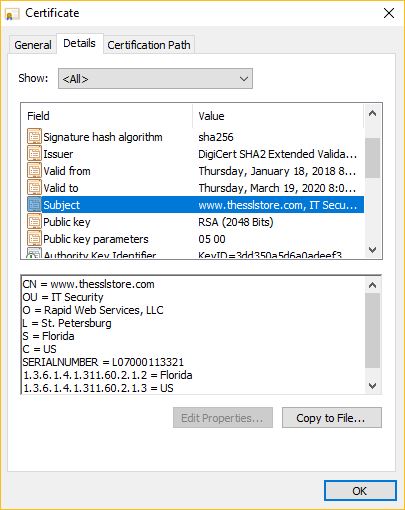
The Subject is the website or organization that the certificate is representing. Depending on the type of certificate (DV, OV, or EV) you will see different amounts of information in the Subject.
A DV certificate will just have a domain name. An OV certificate will include limited company information (a name, a state/province and country). An EV will have detailed company information, such as an exact street address. You can recognize an EV certificate if the browser is displaying the EV Name Badge. Extended Validation offers the most information—that’s why it has a special visual indicator.
If an organization has an OV SSL certificate – which is recommended as a baseline for e-commerce businesses, financial institutions, etc. – then you will be able to see verified business details in the certificate information. Provided the website is registered to the right company, you’re fine. You can probably trust this site.
If it doesn’t, then you need to be careful.
There’s also the possibility that this information isn’t supplied at all. If that’s the case then the website only has a Domain Validated SSL certificate. This doesn’t mean you should automatically distrust the website, but it does mean you need to continue to be skeptical until the site can prove its legitimacy.
4. Look for Trust Seals
When a company or organization makes a substantial investment in their customers’ security, they typically want a little bit of credit for it. That’s one of several reasons that trust seals exist. You’ve probably seen more than a few trust seals in your time on the internet. They look like this:
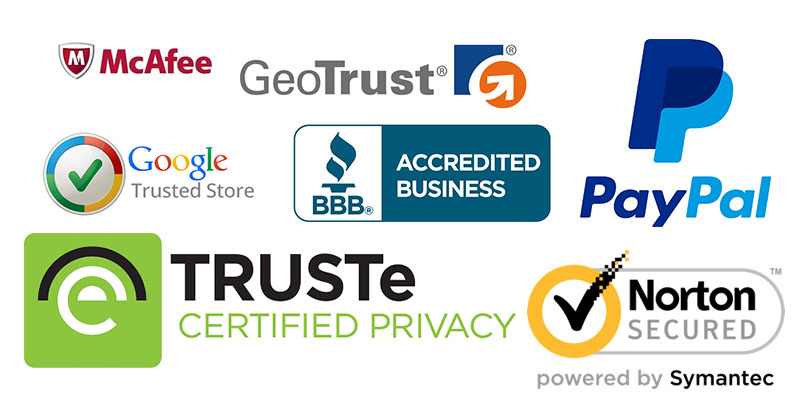
Trust seals are commonly placed on homepages, login pages, and checkout pages. They’re immediately recognizable and they remind visitors that they are secure on this page. It’s not unlike putting a sign in your yard or a sticker in your window that advertises your security system. People know what they mean as soon as they see them.
But did you know you can click on them too?
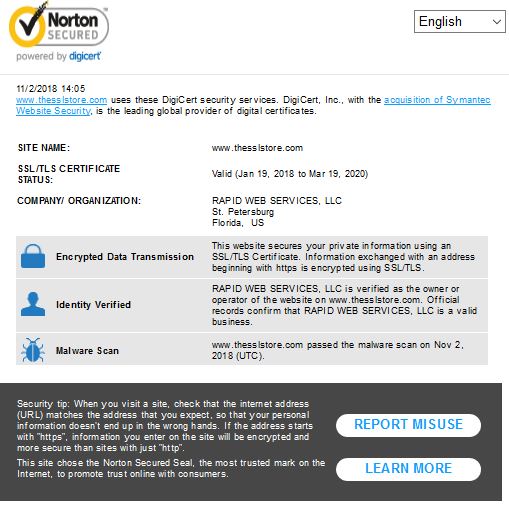
That’s right, most SSL certificates come with trust seals that will display verified information when clicked on. This is important because it lets you know that the SSL certificate is in good standing and might also inform you of additional security mechanisms in place like malware scans or vulnerability assessments. SSL/TLS certificates aren’t the only products that comes with site seals, either.
But, just seeing the site seal isn’t enough, it is essential that you click on it to verify it’s legitimate.
5. Consult the Google Safe Browsing Transparency Report
This is the last resort, but it serves as a nice final safeguard: Google it. Literally. The Google Safe Browsing Transparency Report allows you to copy and paste the URL into a field and it gives you a report on whether or not you can trust that website. It’s not especially fancy, nor does it boast impressive aesthetics, but it certainly is an effective way to determine whether or not a site is unsafe.
Granted, this isn’t the end-all, be-all. Google does occasionally miss stuff. But not for long. When you’re as ubiquitous as Google, nothing escapes your view for long. Google’s Safe Browsing service is amongst the best on the internet when it comes to keeping users safe. If you’re ever in doubt, Google it.
Bonus! You can learn a lot from a Privacy Policy
Right now, in 2018, people are as attuned to their privacy and data security as they have ever been. A big part of that stems from the litany of new privacy regulations that have being instituted the world over– regulations like GDPR. These efforts to legally require companies to safeguard our data and be more transparent have provided an additional, unforeseen benefit, too: it’s now a lot easier to tell a legitimate company or organization from a fraudster.
It starts with the Privacy Policy, no matter where you are — what jurisdiction — organizations are required to provide certain information in their privacy policies. The nice part about this information is you can check it, verify it and make sure that you are dealing with real people and a real website.
Let’s start with a simple binary: is this a passable Privacy Policy? You may not be a connoisseur of privacy pages but chances are you have seen enough of them to be able to tell a real one from something more dubious. The easiest way to check is to look for actual specific information: names of officers or employees, addresses, ways to get in contact and participation in specific programs.
A good example of this would be the EU-US and Swiss-US Privacy Shield program run by the US Department of Commerce, the Department of Transportation and the FTC. US companies that have partners in Europe are oftentimes required to certify themselves in order to comply with the EU’s General Data Protection Regulation. The Privacy Shield has an official list that you can check to verify an organization’s participation, too. Check that list. If you see the company there, you’re set.

If they claim to be certified and they’re not, they’re breaking the law by misrepresenting themselves, which should give you pause. Even if this is a legitimate website, is this the kind of outfit you want to give your business to?
8 More Internet Tips to Help you Spot Fake or Fraudulent Websites
This next section might as well be called our common sense section. That being said, you’d be genuinely surprised how many people ignore this stuff on a regular basis. Here are eight more tips to help keep you safe online.
Trust Your Browser
The browsers are our portal to the internet. We can only go where they take us, and sometimes they don’t want to take us certain places. Do yourself a favor and listen to them when they suggest you not go to a website. Whether it’s Chrome or Firefox or even Edge or Safari – they all let you know when you’re about to stray to somewhere unsavory. And this isn’t just guesswork, either. This is based on data and user reports that clearly indicate a threat. So take that threat seriously: listen to your browser.
Bonus Tip: Despite bad advice from plenty of other articles, NEVER disable your antivirus or drop your firewall. Ever.
Look for Bad English
Good websites take pride in themselves. That means the graphics look sharp, the spelling and grammar is on point and the entire experience feels streamlined and polished. If you’re on a website that feels like it was written by someone with a third-grade education – or by someone who doesn’t speak English as a first language – you may want to be a little bit wary. Especially if those mistakes appear on important pages.
Everyone makes the occasional mistakes—even big companies. But at the point the mistakes become egregious you need to beware.
Look at the Contact Us Section
 Another telltale sign when it comes to whether or not a website is fake or not can be found on its “Contact Us” section. How much information is there? Is an address supplied? What about a phone number? Does that line actually connect to the company? The more information that is supplied, the more confident you should feel—provided it’s actually good information. If all they’re giving you is an email address or, worse, there’s no contact information whatsoever—run.
And remember to verify the information. Google the address, maybe even check out street view. See if any employee that’s listed has a LinkedIn profile. Do a little homework.
Is there an Over-Abundance of Ads?
Ads are a fact of life. No matter where you go, you’re going to run into ads. But if you’re on a website that is more ads than content, tread carefully. If you have to click several links to get through intrusive pop-ups and redirects to reach the intended page—you’re on a website that is probably fake or at least scamming. There’s a fine line between UX and selling ads. When it’s clear that a website has no regard for that line, you need to be wary.
Check the Who.Is
This is another tip for advanced users.
If you really want to know who is running a website there is a database called Who.Is that can tell you what email address it’s registered to. There are a number of free sites that allow you to check a website’s official WHO.IS registration, though GDPR concerns have complicated access lately.
A WHO.IS registration can tell you the owner of a website and if it’s an individual or a company. If it’s a company there will be an “Organization” listed along with an address and phone number. For an individual, there will be a “Name” listed along with an address.
This can be an invaluable tool, especially when you’re dealing with brands. If you’re at a website that claims to be owned by a large company but is registered to some address in another country, there’s a good chance you’re on a fake website.
Check the Shipping and Return Policy
Any legitimate e-commerce company is going to have a shipping and return policy, it’s considered a best practice. So any website that purports to be selling something but lacks this documentation is automatically suspect. Likewise, if you click the link and the policy looks flimsy or has been copy-and-pasted directly from another website, that’s also suspect. Look, we’re not telling you to read the whole thing – nor are we naïve enough to believe you would – but a quick look should tell you all you need to know.
 What forms of payment do they accept?
This is another tip that is more for e-commerce, but what forms of payment does the website offer to accept? Most legitimate companies will take major credit cards and typically have a couple of non-payment card options, too. If a website is asking you to send money to a random PayPal address, wire it by Western Union, pay in iTunes gift cards or only deals in cryptocurrency, that should send up a red flag. The majority of the time, those methods are done to avoid scrutiny and ensure that a transaction can’t be reversed. Remember, a legitimate website would have nothing to hide and likely wouldn’t participate in this kind of suspicious business practice.
Check for a Digital Footprint
The beautiful thing about the internet is that nothing exists in a vacuum. Chances are other people have had experiences with this company and – good or bad – they have shared those experiences somewhere. With just a tiny bit of digging, you can probably figure out if a website is fake based on reviews alone. Google the name of the site along with “+ reviews.” Check with the Better Business Bureau, or one of the myriad scam sites that exist to protect consumers. Just look a little. The internet may not be the best at telling you whether something is good, but it can definitely tell you when something is bad. And all it takes to find out is about three minutes and Google.
Where to Report Fake or Fraudulent Websites
We encourage you to report fake websites. It’s good for the internet, it’s good for your inner chi and if you’re petty—it gives you that good tingly feeling. Here’s where to report malicious websites:
- Google – Safe Browsing
- Mozilla – Protect the Fox
Microsoft gives its users an opportunity to report malicious sites within its browsers. To do this go to the Tools/Safety menu, select Phishing Filter/SmartScreen Filter and click “Report Unsafe Website.”
A Final Word
It’s possible that after reading this guide you’re feeling a little uneasy. That’s not the point we were trying to make. The internet is an amazing place and you can use it for a countless number of worthwhile activities. But, much like anything else in life, there are some dangers. Don’t let that dissuade you, as long as you stay vigilant you’re not likely to run into many problems.
Just stay on the beaten path, trust websites that have made an investment in authentication and be careful if you ever get the sense that something might be off.
Conrads
Michael
I am excited to announce that Ultimate Hacker Jerry is the leading agency for crypto recovery! My name is Michael, a crypto trader who unfortunately fell victim to online scammers. Thanks to Ultimate Hacker Jerry, I successfully recovered my lost assets. I wholeheartedly recommend their services for anyone seeking bitcoin recovery. Don’t let scammers win—reach out to them today!Contact info;Web; https://ultimateshackjerry.com/ Email; ultimatehjerry@hackermail.comWhatsp ; +1727 375 6272
ReplyRaymond